Use JPG, PNG or WebP files up to 10 MB each, with both dimensions between 300 and 6000 pixels and a width-to-height ratio from 0.4 to 2.5. Two-photo mode expects one subject per image. Joint-photo mode expects both subjects clearly visible together.
Updated
Match the photo count to your video effect
Hotel Lobby and the other rap effects use a pair; the duet guidance below applies to those two subjects. Raindance also uses two people. Bécane and STORM II start with one person, so choose a solo portrait for those effects.
Select the effect before choosing your files so that the creator shows the right input mode. For a solo effect, keep unrelated faces out of the photo. For a duet, make each intended subject easy to distinguish. The file format, dimensions and lighting checks below remain useful for both.
| Effect | Subjects needed | What to upload |
|---|---|---|
| Hotel Lobby and rap duet effects | Two people, two pets, or a person and a pet | Two separate photos with one subject each, or one joint photo showing both subjects |
| Raindance | Two people | Two individual portraits, or one shared photo with both faces clear |
| Bécane | One person | One clear solo portrait for the performer at the microphone |
| STORM II | One person | One clear solo portrait; you do not need to upload a crowd photo |
Check the actual upload requirements
The photo check on this page reads dimensions and gives basic exposure feedback locally in your browser. It does not upload the image, identify faces, assess consent or predict generation quality. Passing the check means the file fits the measured requirements, not that the model will preserve every facial detail.
An image named .jpg can still be corrupt or contain a different format. Export a fresh supported still image when decoding fails. A very narrow crop or panoramic joint photo can exceed the ratio limit even when its file size is small. Enlarging a thumbnail may pass the pixel check while leaving it visibly blurry.
| Requirement | RapDuo accepts |
|---|---|
| File type | JPG/JPEG, PNG or WebP |
| Size | No more than 10 MB per photo |
| Dimensions | 300 to 6000 pixels on each side |
| Width divided by height | 0.4 to 2.5 |
| Photo count | Two separate images or one joint image |
| Animation | A single still image, not an animated file |
Choose two separate portraits or one joint photo
Separate references make it easier to replace one weak image without changing the other. Joint mode is supported, but does not guarantee that a crowded group photo will be interpreted correctly. The first and second uploads identify performers; fixed left/right placement or who raps first is not guaranteed.
| Input | When it is useful | What to watch |
|---|---|---|
| Two separate photos | Subjects are apart, or you have a strong portrait of each | Use one subject per photo and check both upload previews |
| One joint photo | Both subjects already have clear faces in one image | Avoid overlap, extra people and one tiny distant face |
| Two crops from one photo | Each crop keeps enough genuine detail | Both crops still need to meet the minimum dimensions |
| Same person twice | You have permission and want a playful double | Use distinguishable outfits if the concept needs two roles |
Compare a helpful portrait with a risky one
Headshots help communicate a face; wider portraits also supply clothing and body information. Choose the framing that best captures the details important to your idea. The generator invents movement and may reinterpret outfits, hands or proportions, even from a good source.
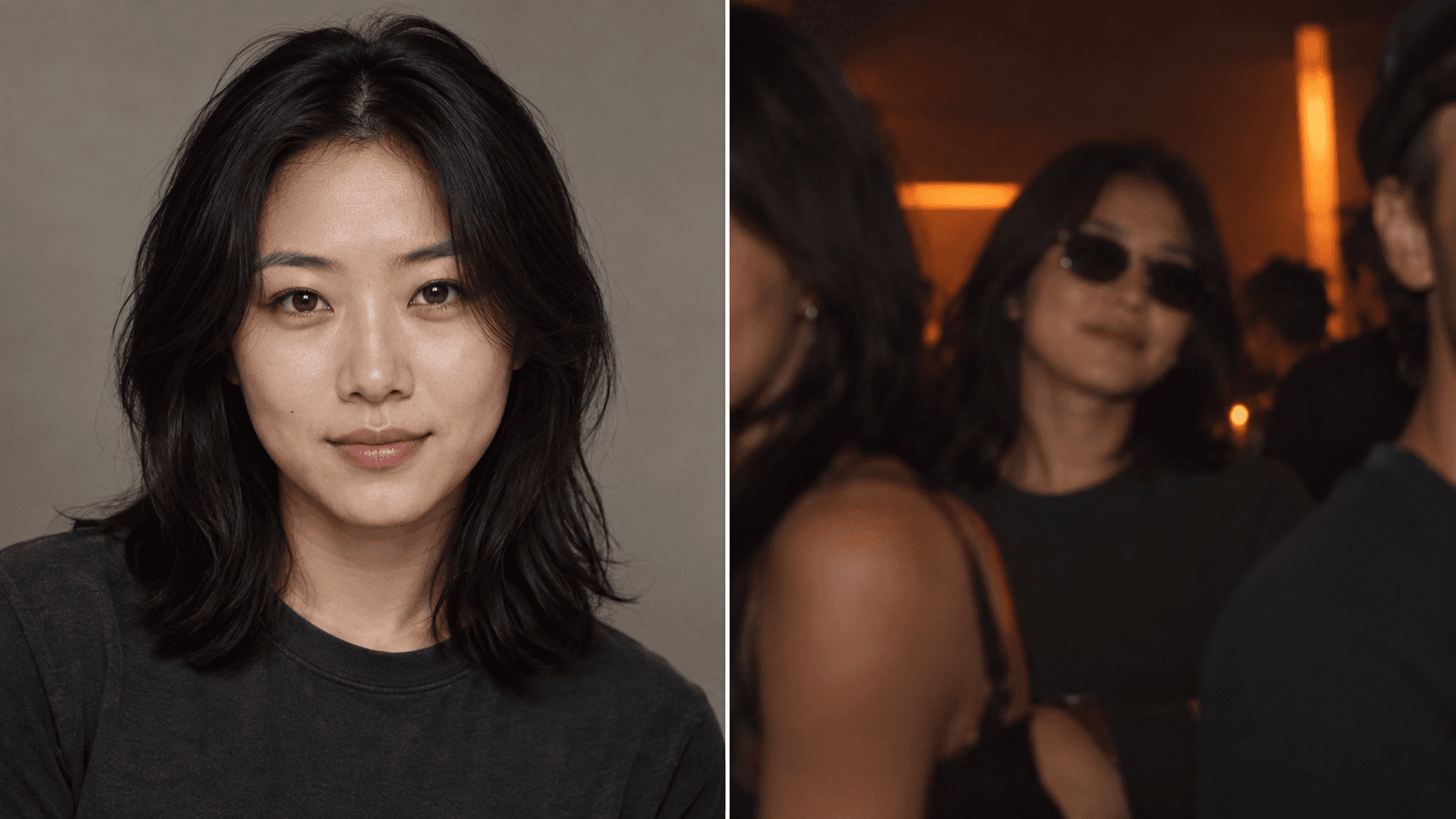
- Helpful: a sharp face looking toward the camera or at a slight angle, with both eyes and the mouth readable. Risky: a strong profile, motion blur or hair across the face.
- Helpful: even daylight or soft indoor light. Risky: one half of the face in deep shadow or a strong color cast that hides skin detail.
- Helpful: an original photo with head, shoulders and some clothing visible. Risky: a tiny social avatar, a filtered screenshot or a crop through the forehead and chin.
- Helpful: glasses with little glare and visible eyes. Risky: dark sunglasses, reflections hiding both eyes, masks or a hand covering the mouth.
Keep both references equally useful
Choose the performance after checking the pair. Birthday, battle and pet effects change the creative direction, while the source photos supply visual information. The documented friends case uses an actual joint reference already on an orange stage; it does not prove that every everyday selfie will transfer equally well.
- Check each face at the same viewing size. If one is much smaller, blurred or strongly shadowed, find a clearer source for that performer before changing model settings.
- Keep genuine detail around the head, shoulders and clothing. Cropping away a background stranger is useful; stretching a tiny face to meet the pixel minimum only makes a larger blurry file.
- For a joint photo, confirm that neither face overlaps the other and that both can be seen without an extreme crop. If one subject is too distant, two separate references may be a better starting point.
Prepare cats, dogs and a person with a pet
Use a clear view of the animal's face, ears and distinctive coat markings. Take the photograph at the pet's eye level where practical. A dark animal needs enough light to separate its eyes and muzzle from the fur; a white animal needs detail rather than a blown-out patch.
Keep the animal unobstructed by a cage, toy or another pet. In joint mode, both the person and animal should be clearly visible rather than one hidden behind an arm. Choose Pet duet for playful animal personality. Exact coat markings, anatomy and mouth movement can vary. Inspect the full result, including the moments when the animal moves.
Check the photo preview before the paid request
Selecting images previews them in your browser. Save draft stores your topic and settings without uploading the selected images; you will need to select them again when resuming. A live generation sends the required photos for rendering and safety checks.
Use images you own or may use, and get consent from pictured people. The published Privacy Policy explains photo and video processing, retention and deletion requests. Ask through Contact for data access or deletion. Once your inputs look suitable, review the generation quote before confirming.
Check a photo locally
Your file stays in this browser. This tool checks dimensions and exposure, not faces or likeness.
Check manually: both eyes and face or muzzle visible, no heavy blur, and the intended subjects easy to distinguish.
Questions before you create
Should I remove prescription glasses?
You do not need to change someone's usual appearance automatically. Prefer a photo with visible eyes and limited glare. Dark lenses or strong reflections provide less facial information.
Can I upload HEIC, GIF or a video?
The creator accepts still JPG, PNG and WebP images. Convert other photo formats to a supported still format first. It does not accept a custom video reference.
Do better photos guarantee the same face?
No. They improve the information available to the model, but face shape, pet markings, gestures and clothing may still vary. Inspect the whole result.
Does higher output resolution fix a blurry source?
Output resolution cannot recover missing reference detail. Choose a sharper source before paying for another generation.
Can I use a group photo in One photo mode?
One photo mode is intended for the two visible subjects, not an automatic group-casting control. Crop out unrelated people only when both intended subjects retain sufficient genuine detail and the file still meets the upload requirements.