The pet effect creates a new musical scene around your animal references, with expressive movement and generated rap vocals over a beat. Pair two pets or a pet and a person using separate photos or one clear shared image. Animal markings, anatomy and mouth movement can vary, so inspect the entire result. Watch the dog-and-cat and owner-and-dog samples on this page with their actual reference photos and recorded settings.
Updated
Choose a duo your friends already know
Two cats, two dogs, a dog and cat, or an owner and pet all give the performance a recognizable relationship. Separate photos work when the animals will not sit together or live in different homes. A shared photo is useful when both faces and bodies are easy to distinguish.
The scene is generated; your pet does not need to stand upright, wear headphones or hold a microphone for the reference. The pet performance aims for recognizable animal appearance with playful musical behavior. It is not a recording of a pet speaking or a clone of its bark or meow.
For two people, choose the standard duo. For an animal pairing, use the pet effect even if the occasion is a birthday or adoption anniversary, then add the occasion as an optional personal detail.
Three atmospheres for the same familiar pair
These are performance choices, not pet-quality benchmarks. The available photos and the generated take determine how well distinctive markings and movement survive.
Orange studio pet duo
A pet pair or pet-and-owner performance on a simple orange set, with the animal references at the center of the joke and original rap audio.
Use this ideaPet studio session
A playful recording-room performance with blue and cyan lighting. Suits a closer owner-and-pet duet or a pair with very different personalities.
Use this ideaStreet-style pet pair
An energetic animal duo in an urban stage setting. A lively choice for two household rivals, with playful performance rather than an exact real-world animal action.
Use this ideaMake your dog rap from a photo
Make your dog one of the two performers: add its photo and a co-star, such as another dog, your cat or you. A single file works when both subjects are clearly pictured together; one dog alone is not the current pet duet input.
Give the performance one familiar dog habit to work with: waiting by the leash, claiming the sofa or checking the snack cupboard. A recognizable routine makes the joke about your dog, rather than a generic animal on a microphone.
Make your cat rap from a photo
Choose your cat and a partner for the Pet duet: another cat, a dog or its owner. For a cat curled up in a basket, use a reference where the face and ears are distinct from the bedding; the generator supplies the performance pose.
Keep the idea centered on one cat routine, such as nighttime zoomies, cup pushing or guarding a favorite sunny spot. Use that familiar detail to guide the original rap, then check whether the finished joke still fits your cat's personality.
A dog-and-cat rap duet
Separate photos are useful when your dog and cat will not pose together. Keep Pet duet selected for the animal pair, including a playful rivalry; the pets do not have to look at each other or touch in the references.
Choose a contrast people in your household know: a dog ready for a walk beside a cat ready for a nap, or the pair negotiating the same sofa. One detail about each gives both animals a part in the idea without asking for a long story.
Compare a dog-and-cat Pet duet with its reference photos
This Pet duet uses two separate references: a brown-and-white dog with long ears and a gray tabby cat with a white chest. Compare those details with the full video, rather than judging the animals from the poster alone.
Play the clip with sound and follow each animal through the performance. Check the muzzle, ears and coat as they move, and listen for how the generated delivery fits the pair. This is one take with the recorded settings below, not a pet quality ranking.
This take opens with both animals together, moves to dog-focused and then cat-focused views, and ends with both animals visible. The reference images show home interiors; the orange performance setting is generated.
The two input photos
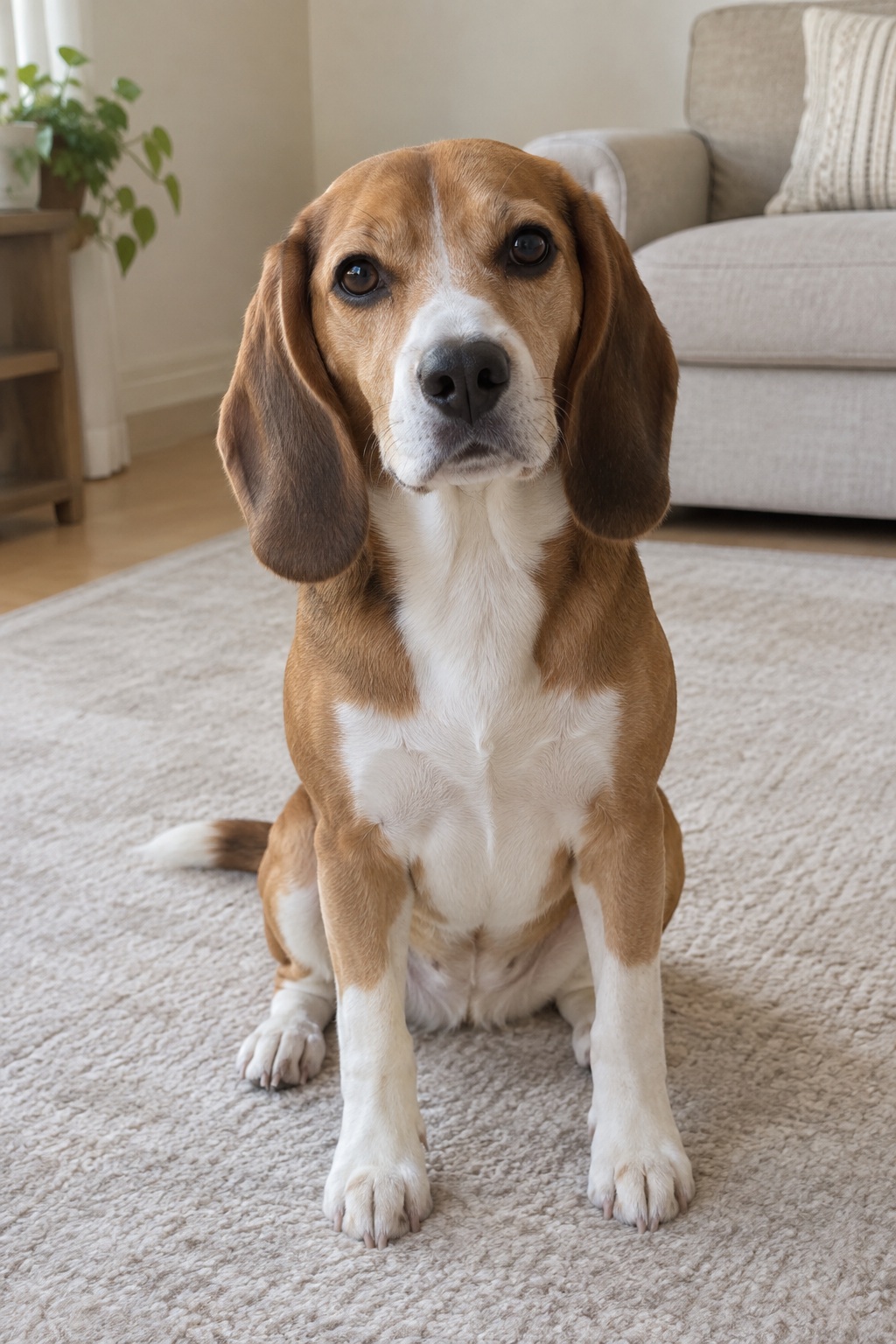
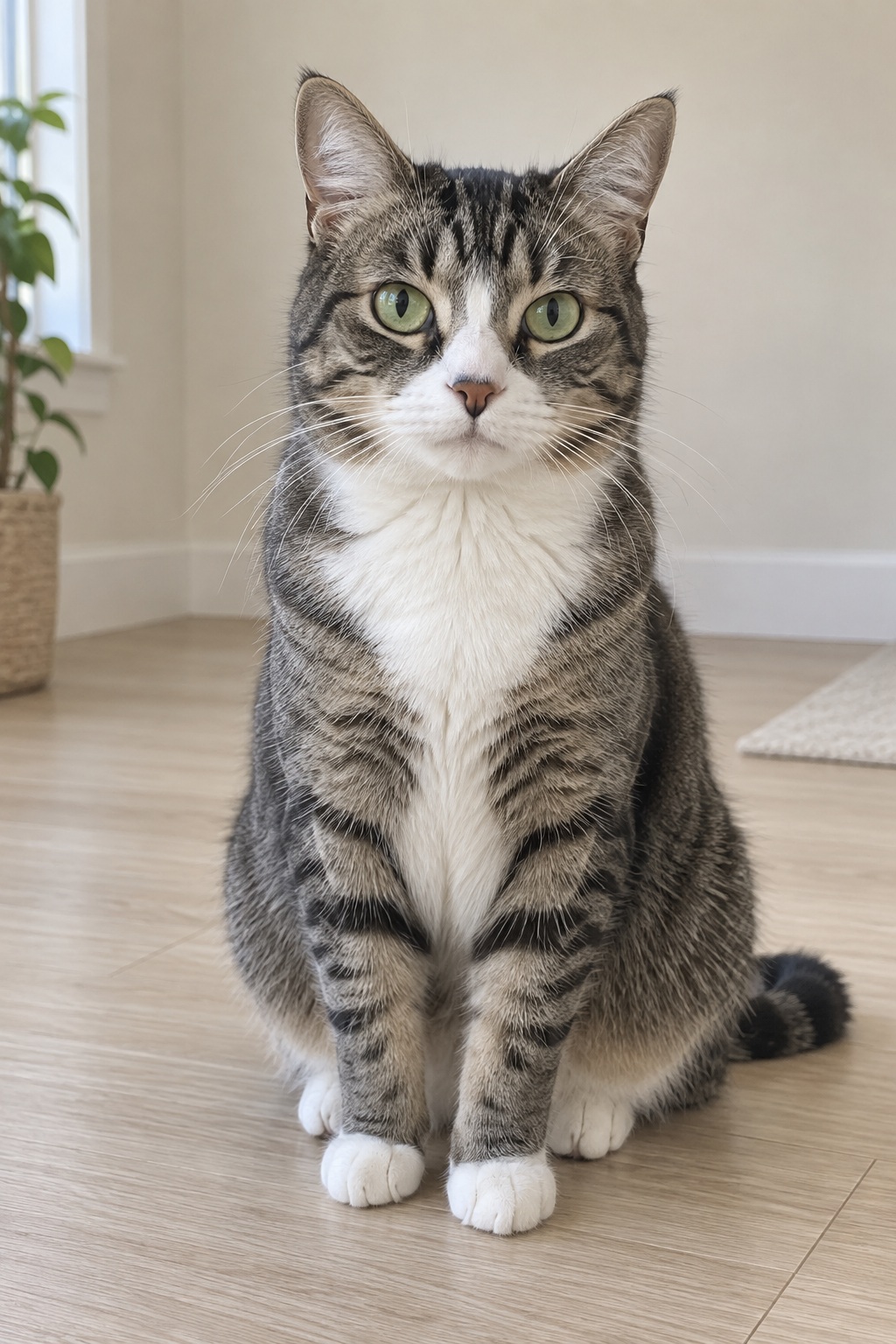
Fictional AI-generated subjects. These ordinary photos were processed with the same photo preparation and generation preset used by the creator.
| Setting | This sample |
|---|---|
| References | Two separate pet photos |
| Performance | Pet duet |
| Stage | Hotel Lobby |
| Model | Standard / Seedance 2.0 Mini |
| Quality | 720p |
| Length | 12 seconds |
| Frame | 9:16 vertical |
Rap with your dog or cat
Pair your portrait with your pet's photo and keep Pet duet selected. A shared owner-and-pet photo also works, but if holding the animal hides its muzzle or covers your face, separate references make the intended performers clearer.
Build the greeting around something you do together: the morning walk, a treat negotiation or the day the pet came home. You and the animal are the two subjects; no extra human partner is needed.
Compare an owner-and-dog Pet duet with its references
This Pet duet uses a separate adult portrait and dog photo. Compare the adult's dark hair and black shirt, and the dog's brown-and-white coat and long ears, with their appearances throughout the clip.
Watch the human and animal together with sound. Check which subject is performing, how the companion reacts and whether both remain recognizable. This mixed pairing has its own example; a dog-and-cat result alone does not show how an owner-and-dog performance will turn out.
This take begins with the adult and dog sharing the frame, moves closer to the dog in the middle, and brings them together again for the ending. Their poses and framing change through the clip.
The two input photos
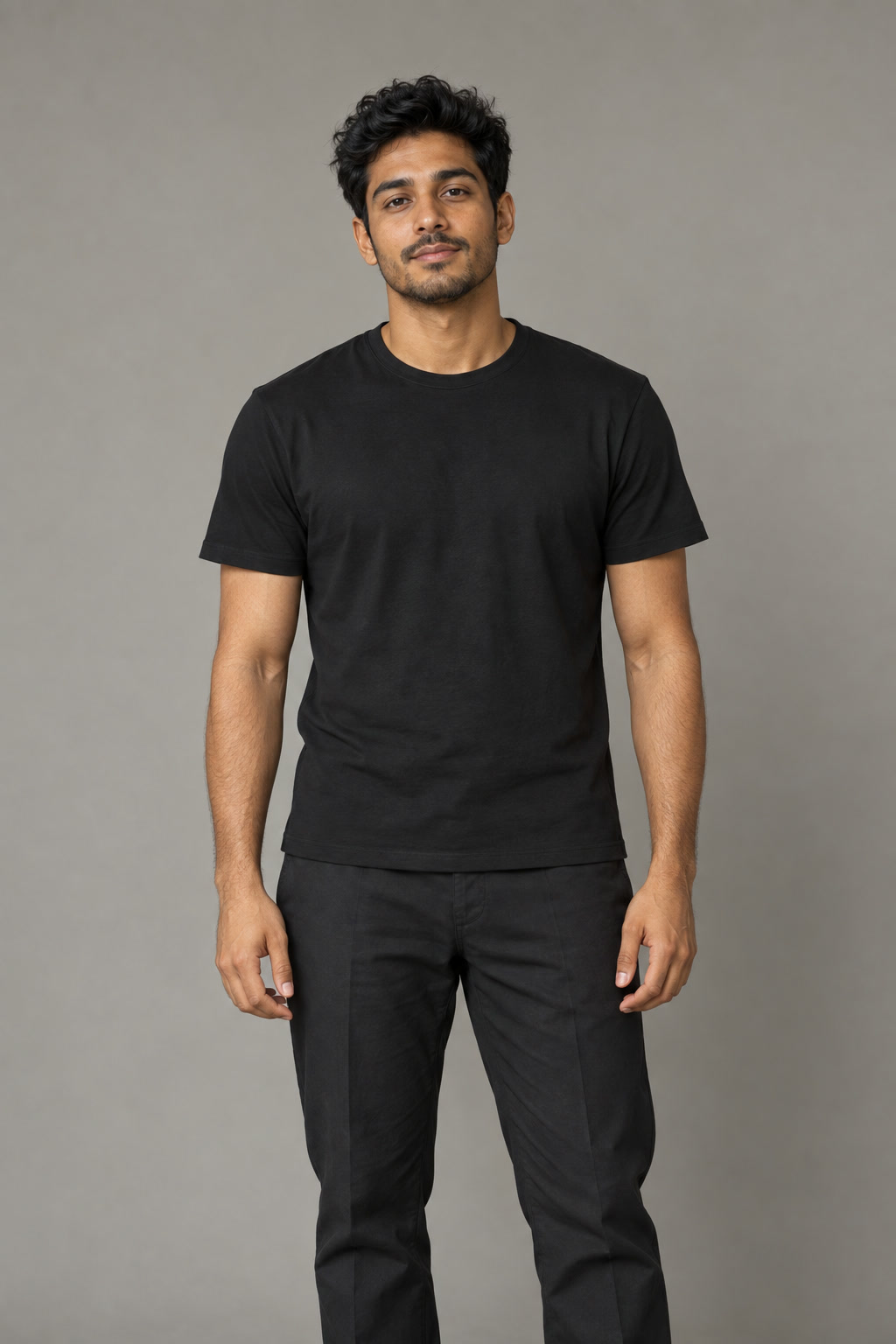
Fictional AI-generated subjects. These ordinary photos were processed with the same photo preparation and generation preset used by the creator.
| Setting | This sample |
|---|---|
| References | One adult portrait and one dog photo |
| Performance | Pet duet |
| Stage | Hotel Lobby |
| Model | Standard / Seedance 2.0 Mini |
| Quality | 720p |
| Length | 12 seconds |
| Frame | 9:16 vertical |
Make the muzzle, eyes and markings readable
Upload JPG, PNG or WebP, up to 10 MB per file. Each image must be 300 to 6000 pixels on both sides, with a width-to-height ratio from 0.4 to 2.5. Choose two separate references or one photo containing both subjects. Larger file size does not repair blur.
Use a normal, comfortable photo. Wait for a clear frame from your own camera rather than staging an uncomfortable pose. Costumes and collars can inform appearance, but cannot be guaranteed unchanged. Stickers, filters and heavy compression reduce useful reference information.
| Reference detail | Prefer | Avoid |
|---|---|---|
| Eyes and muzzle | A sharp front or slight three-quarter view | A nose filling the lens, closed eyes or a hidden muzzle |
| Fur and markings | Soft even light showing coat color and texture | Black fur disappearing into shadow or white fur washed out |
| Animal shape | The full head, ears and a useful amount of body | Cropped ears, paws covering the face or extreme close-ups |
| Number of subjects | One animal per reference, or two distinct subjects together | A crowded litter, extra pets or overlapping heads |
| Similar-looking pets | Separate images with visible distinguishing features | Two almost identical faces hidden in one small group photo |
Give the clip a reason to exist
One recognizable detail suits a short performance better than a biography. Names and personal details are optional; you do not need to write a verse or a scene template. The generated words may change, so judge whether the finished joke still makes sense.
- An adoption anniversary can celebrate the relationship between a pet and the person who brought it home.
- A pet birthday can focus on the animal's personality without publishing an address, owner contact details or other private information.
- A household duo can play on familiar routines, favorite toys, naps or harmless rivalry.
- An owner duet can mark a shared activity or memory, such as a regular walk or the first day together.
- A pet account can use the clip as a clearly disclosed AI-created moment, while ordinary photographs show the animal's real appearance.
From reference photos to a finished pet performance
Pick the pair
Add separate pet portraits, or a pet and owner photo. In shared-photo mode, check that the intended two subjects are visible and distinct. Confirm permission for the images and any human subjects.
Choose the pet effect
Keep the animal performance selected and choose orange studio, Studio Booth or Street Cypher. Add names and the occasion only if they are useful to your video.
Check size, shape and budget
Select the available model, resolution, duration and format. Review the current credit cost. Shorter clips need fewer generated moments and less room for a story, but do not guarantee fewer artifacts.
Generate and inspect
Confirm the paid generation, then review the completed clip with sound. Check the muzzle, coat, eyes, ears, paws, proportions and interaction throughout the movement. Download after checking the result.
What to look for before sharing
Check identity in motion, not just in the first frame. A pet may start with plausible markings and change as it turns; ears can shift, paws can multiply and muzzle shapes can become exaggerated during vocal delivery. The owner can drift too in a mixed human-and-animal duo.
Dogs and cats are common pairings, but we do not publish a verified breed ranking or success rate. Birds, rabbits and other animals can be requested, with greater uncertainty around unusual anatomy. A higher-priced tier is not a guarantee that a particular species will be reproduced correctly.
The two pet samples show specific outcomes for a dog-and-cat pair and an adult-and-dog pair. Watch them with their actual reference photos and recorded settings; they do not establish how every animal or photo will turn out. The documented friends case remains a human case.
Choose the final format and understand the cost
Standard, Fast and Pro currently generate at 720p. Ultra offers 480p or 720p. Available durations are 5, 8, 10, 12 and 15 seconds; formats are 9:16, 1:1 and 16:9. 1080p is not available for live generation.
Choose 9:16 for a phone story, 1:1 for a square pet post or 16:9 for a wider pair. A tight later crop can remove a pet's ears or its companion. A brief clip suits one moment; 12 or 15 seconds leaves more room for the pair without promising exact names or lines.
Standard at 720p for 12 seconds costs 10 credits. The Single pack is $9.99 for 10 credits, enough for this setting. Prices are in USD before applicable taxes; the current quote controls the cost of other settings.
Personalized video generation requires paid credits, and there is no personalized preview before generation. Public demos are free to watch before purchase. Technical failures, timeouts and safety-blocked renders return prepaid credits automatically. A completed video with a creative result you dislike is not a failed render.
The pet performance uses the selected model's normal quote, with no separate pet surcharge. Pack credits do not expire and packs do not renew. Optional subscriptions have billing-period credit expiry. Another creative attempt requires another paid generation.
Personal details are optional and limited to 240 characters. The generator follows the selected site language by default. Details in another language can guide a different vocal language. Listen for changed wording and pronunciation: generated lyrics are not an exact transcript, approved script or guaranteed translation.
Use photos you are permitted to upload and get permission from the people pictured; minors require parent or guardian consent. Live generation sends images to a processing provider. Drafts save settings and personal details without saving uploaded photos. The published Privacy Policy explains photo and video processing, retention and deletion requests.
Calculate your video cost
- credits
- 10
- Pack purchase
- $9.99
- Complete videos
- 1
- Credits left
- 0
- Allocated cost per video
- $9.99
Estimates use current studio settings and USD pack prices. Existing credits may cover your video. Taxes, if any, appear at checkout. Packs never expire; subscription credits follow their billing period.
Questions before you create
Can both performers be pets?
Yes. Use one reference for each animal, or one photo with both clearly separated. Two dogs, two cats or a mixed pair can share the pet performance.
Can I appear with my pet?
Yes. Use the pet effect with your animal and an authorized human portrait. Review both appearances and the interaction after generation.
Do the photos need to have been taken together?
No. Separate reference photos can come from different homes and times. A similar scale and clear view of each face make the intended pair easier to identify.
Will my pet's markings stay exact?
Exact markings, proportions and motion are not guaranteed. Use even light and visible distinguishing features, then check those details across the entire clip.
Is there a real pet demo to inspect?
Yes. This page includes a dog-and-cat Pet duet and an adult-and-dog Pet duet, with input photos, full videos and recorded settings. They are actual generated outputs made with fictional references, not a pet quality benchmark.
Can the video use my pet's real bark?
The performance has generated rap vocals and a beat. Uploading a bark, meow, custom song or a voice sample is not part of the current generator.
Do I need to make my pet pose like a rapper?
No. A comfortable, clear normal photo is enough as a reference. The effect generates the musical setting and movement.
Can I try pets for free before paying?
Public demos are free to watch. A personalized pet generation is paid and has no personal preview beforehand. A completed result with animal drift is not automatically a failed render.
Can I make a pet birthday or adoption-day greeting?
Yes. Keep the pet performance and add the occasion in your optional personal details. Generated words can be altered or omitted, so listen before sending.